HOW TO SHOW CROSSLINE?

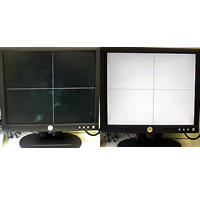
HD microscope Camera / PC monitor Direct with microscope camera has a standard cross line display function. You can turn on / off the cross line with the switch on the back.


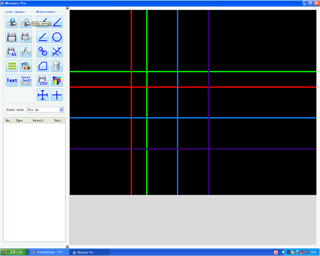
For USB microscope camera, it is possible to display multiple cross lines by using optional Viewer software (MeasurePRO / MeasurePRO – Ex).


クロスライン
クロスライン

HD microscope /

PC monitor direct with microscope has standard cross line display function

(Both white line and black line can be displayed)

USB microscope optional

Software MeasurePRO /

MeasurePRO – Ex

Multiple cross lines can be displayed!


クロスラインを表示させたいのですがどの様な方法がありますか?

ハイビジョンマイクロスコープ/PCモニタダイレクトマイクロスコープのカメラには標準でクロスライン表示機能が付いております。背面のスイッチでクロスラインのオンオフが可能です。

USBマイクロスコープのカメラの場合はオプションのViewerソフトウェア(MeasurePRO/MeasurePRO-Ex) を使用すれば複数のクロスラインを表示することが可能です。

クロスライン
クロスライン
ハイビジョンマイクロスコープ/
PCモニタダイレクトマイクロスコープ
ではクロスライン表示機能が標準で装備
(白線/黒線どちらも表示可能)
USBマイクロスコープオプションの
ソフトウェアMeasurePRO/
MeasurePRO-Exでは
複数のクロスラインの表示が可能!

MUỐN HIỂN THỊ CROSSLINE THÌ CÓ CÁCH NÀO KHÔNG?

Camera của Microscope HD / Microscope kết nối màn hình PC theo tiêu chuẩn có chức năng hiển thị crossline. Có thể bật / tắt hiển thị crossline bằng công tắc trên mặt lưng của camera.

Với Camera của Microscope USB, có thể cho hiển thị nhiều đường crossline bằng cách sử dụng phần mềm Viewer tùy chọn (MeasurePRO / MeasurePRO-Ex).

CROSSLINE
CROSSLINE

Microscope HD/
Mircoscope kết nối màn hình PC
Thiết bị tiêu chuẩn trang bị tính năng hiển thị crossline
(có thể hiển thị đường màu đen

hoặc màu trắng)

Phần mềm tùy chọn của Mircoscope USB MeasurePRO/
MeasurePRO-Ex
có thể hiển thị nhiều đường crossline!