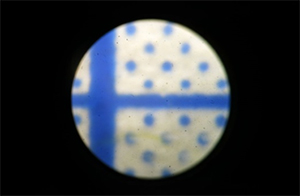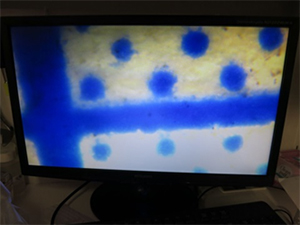
Field of view when taking Full HD photograph by microscope

High definition video will be horizontally image of 16: 9. (1920 X 1080)

 

The field of view of the stereo microscope is a round view.

 

To take pictures of a microscope with a Full HD camera, there are two following methods.

1.

If shooting all fields of view of the microscope, put out small images on the monitor.

(The resolution will be about ¼)

    2.

If shooting to avoid dark conrner,

It will be smaller than the actual field of view.

(In fact, it is enlarger)

it will be smaller than the field of view


Field of view observe with the naked eyes   HDCE-20T
Full HD camera images for the HDCE-20T microscope


If you want to extend the field of view, you should use a 4: 3 camera (PC monitor direct with (analog RGB) camera or video camera) and se a len with a wide field of vision. (Some vignette will come out.)


Below picture is microscope camera with X 0.36 lens attached to our PC monitor direct (analog RGB) camera.

* Shadows appear in the four corners. Resolution is also lower than Full HD.
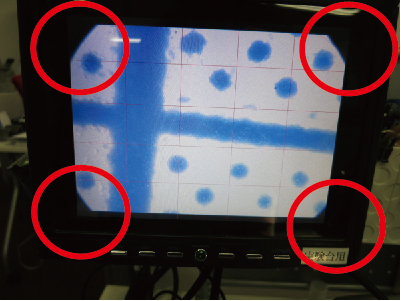
 

Use a 4: 3 camera and a wide field of vision len, the image likes the picture below.

GÓC NHÌN TRONG TRƯỜNG HỢP CHỤP ẢNH FULL HD BẰNG KÍNH HIỂN VI

Hình ảnh Full HD là hình ảnh ngang tỷ lệ 16:9 (1920X1080)


Trường nhìn của kính hiển vi là trường nhìn hình tròn.


Để chụp ảnh của kính hiển vi bằng Camera Full HD  thì có 2 cách sau

1.

Trường hợp chụp trường nhìn tổng thể của kính hiển vi thì
trên màn hình hình ảnh sẽ nhỏ lại
(độ phân giải ở mức khoảng 1/4)

  2.

  • Khi chụp để không bị tối 4 góc

thì sẽ nhỏ hơn trường nhìn thực tế
(theo thực tế thì được mở rộng hơn)


Trường nhìn quan sát bằng mắt thường


Hình ảnh chụp bằng Camera Full HD dùng cho kính hiển vi

HDCE-20T


Trường hợp muốn mở rộng trường nhìn, thì dùng Camera  4:3  ( Camera kết nối màn hình PC (analog RGB) hoặc Camera Video và ống kính góc rộng.(sẽ có 1 chút vignette)

Dưới đây là hình ảnh của Camera dùng cho kính hiển vi của công ty chúng tôi Camera kết nối màn hình PC (analog RGB) gắn với ống kính 0.36x
*Sẽ bị tối ở 4 góc. Độ phân giải cũng giảm hơn loại Full HD


 Dùng Camera 4:3 và ống kính góc rộng 
thì sẽ như ảnh dưới đây.

顕微鏡写真をハイビジョン撮影する場合の画角

ハイビジョンの映像は 16:9 の横長の映像となります。(1920X1080)

顕微鏡の視野は丸い視野となります。

ハイビジョンカメラで顕微鏡の映像を撮るため為には下記の2つの方法のいずれかとなります。

1.
顕微鏡の全ての視野を撮影する場合、
モニタ上に小さく映像を出します。
(解像度が1/4程度になります。)
    2.
ケラレ(影)を出さないように撮影すると
実際の視野より小さくなります。
(実際より、拡大されてしまいます。)
 
     
裸眼観察の視野   HDCE-20T
顕微鏡用ハイビジョンカメラで撮影


視野を広げたい場合、4:3のカメラ(PCモニタダイレクト(アナログRGB)カメラやビデオカメラ)を使い、視野の広いレンズを使います。(若干のケラレは出ます。)

下記は弊社のPCモニタダイレクト(アナログRGB)カメラにX0.36のレンズを取り付けた顕微鏡用カメラの映像です。
*四隅に影が発生します。解像度もハイビジョンよりは落ちます。

4:3のカメラを使い視野の広いレンズを使用 
下図のようなイメージです。